



Account Deletion or Deactivation
Follow the steps below to delete or deactivate your account on the Fanzium application.
How to Delete Your Account
If you wish to permanently delete your account, you can do so directly from the application. Here are the steps to follow:
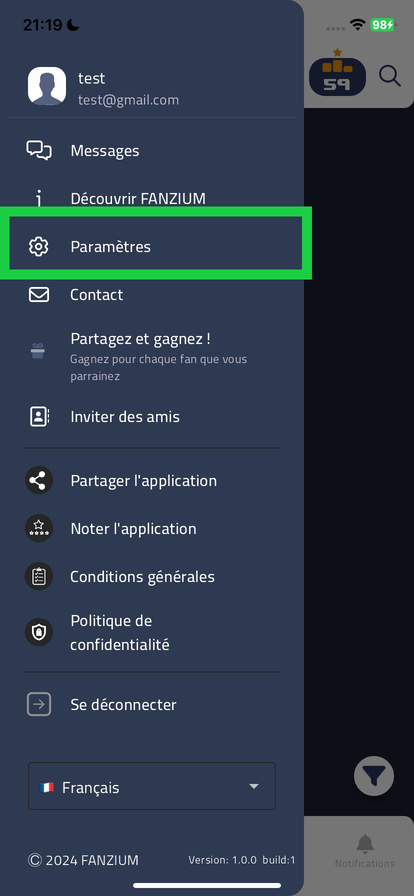
- Open the application and go to your Profile.
- Select the Settings option.
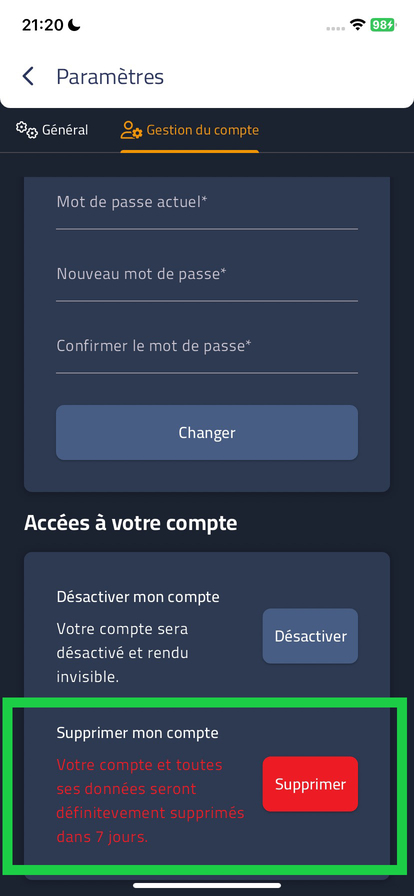
- In the Account Management section, choose Delete my account.
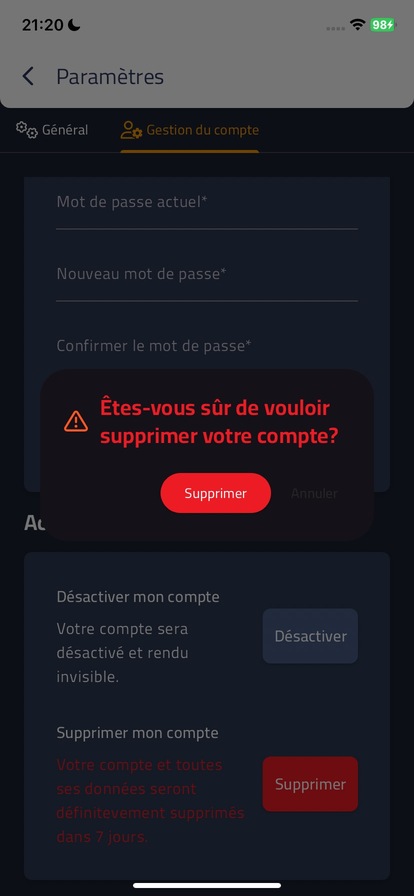
- Once confirmed, your account will be permanently deleted after a 7-day period.
Note: Once your account is deleted, all your data will be permanently erased after 7 days.
How to Deactivate Your Account
If you don't want to permanently delete your account, you can also choose to deactivate your account. This will allow you to reactivate it at any time.
- Go to your Profile in the application.
- Select the Settings option.
- In the Account Management section, choose Deactivate my account.
Note: Account deactivation is reversible, you can log back in at any time to reactivate your account.
Contact Us
If you have any questions about deleting or deactivating your account, don't hesitate to contact us at: [email protected].